Cross-Platform Apps
aibizmod delivery
Strategy, implementation, launch, and support with one connected technical team.
What This Service Solves
Identifying the hurdles
Building and maintaining separate iOS and Android codebases doubles the development and ongoing maintenance cost for most standard mobile applications. Features are built twice. Bugs need to be fixed in two places. Releases need to be coordinated across both platforms. For apps whose requirements fall within what cross-platform frameworks handle well, this cost is not justified by the marginal benefits of fully separate native codebases.
- Budget or timeline constraints making two separate native codebases impractical
- Feature parity problems between iOS and Android versions when teams build them separately
- Maintenance burden of two codebases compounding with every feature added
- Cross-platform framework previously attempted with poor results due to incorrect framework choice or poor implementation
Our approach & solution
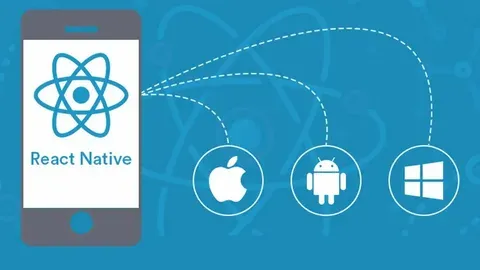
We build cross-platform mobile apps using Flutter or React Native, chosen based on your specific requirements and team context. Both frameworks can access native device APIs, produce genuinely smooth 60fps animations, and deliver apps that feel appropriate on each platform — without the cost of maintaining entirely separate codebases.
- Framework recommendation based on your specific feature requirements, existing codebase, and team
- Shared codebase with platform-specific adaptations where the user experience requires them
- Access to native APIs via plugins or platform channels for device features your app needs
- Single release pipeline managing both App Store and Google Play from the same codebase
What This Service Includes
Engineered capabilities and modular architectures designed to scale your operations with end-to-end reliability.




Flutter Development
Build iOS and Android apps using Flutter and Dart, with a single codebase, custom widget rendering, and genuine 60fps performance across both platforms.
React Native Development
Build iOS and Android apps using React Native with JavaScript or TypeScript, sharing business logic and UI components while rendering through platform-native components.
Platform-Specific Adaptations
Implement platform-specific navigation patterns, styling, and interaction behaviour where the experience should differ between iOS and Android.
Native Module Integration
Access platform-specific functionality through native modules or plugins when the cross-platform layer does not cover a required capability.
Performance Optimisation
Profile and optimise app performance covering render performance, memory usage, startup time, and network efficiency for a smooth user experience on both platforms.
App Store and Play Store Release
Handle code signing, build configuration, store listing preparation, and the full submission process for both the App Store and Google Play.
How Businesses Use This
Real-world applications across industries — drag or click the cards to explore.


Mobile Companion App for a Web Platform
A SaaS company needed an iOS and Android mobile app complementing their web product. Flutter allowed a single team to build and maintain both platforms against the same API.
Business Outcomes You Can Expect
Single Team Maintains Both Platforms
One team with one codebase is more efficient to staff and operate than two separate iOS and Android teams, or one team maintaining two parallel codebases.
Faster Time to Market
Shipping both platforms simultaneously from one codebase is faster than sequencing separate native builds, getting your application to both audiences at the same time.
Shared Codebase with Appropriate Platform Adaptation
Business logic, data fetching, and state management are shared. Platform-specific navigation patterns and styling can be adapted where the experience genuinely needs to differ.
Native-Quality Performance
Modern cross-platform frameworks — particularly Flutter — render at 60fps and produce smooth, responsive applications that users cannot distinguish from native apps in standard interactions.
Significantly Lower Build and Maintenance Cost
For standard mobile applications, cross-platform development costs 40 to 60 percent less than building and maintaining equivalent separate native codebases.
Both Platforms from One Build
A single codebase means features are built once, bugs are fixed once, and both platforms are always in sync — removing the coordination overhead of parallel native development.
Questions Before We Start
A Few Things Clients Usually Ask
Find answers to common questions about Cross-Platform Apps solutions, setup procedures, scoping timelines, and deliverables.
What is the difference between Flutter and React Native?
Flutter uses Dart and renders its own UI using a custom rendering engine (Skia/Impeller), which gives it highly consistent visual output across platforms and very good performance. React Native uses JavaScript or TypeScript and renders through native platform components, which means it more closely follows platform UI conventions but has historically had more performance edge cases. Both are production-ready choices. We typically recommend Flutter for greenfield projects and React Native when a team has existing React or JavaScript expertise.
Can cross-platform apps access all device features?
Almost all device features are accessible through the plugin ecosystem for Flutter and React Native. Camera, location, push notifications, biometric authentication, file system access, Bluetooth, and many others are well-supported. Cutting-edge or very platform-specific features may require writing a native module, which adds cost but is entirely possible within a cross-platform project structure.
How does performance compare to native apps?
For the vast majority of mobile applications — forms, data display, navigation, animations, and standard UI interactions — cross-platform frameworks produce performance indistinguishable from native to users. The cases where native has a measurable advantage are high-frame-rate real-time graphics, intensive AR processing, and very low-level audio or sensor work. We assess whether your requirements fall into these categories during scoping.
How do you handle platform-specific design differences between iOS and Android?
iOS and Android have different navigation paradigms, typography scales, and interaction conventions. We implement platform-specific adaptations for navigation patterns, icon styles, and interaction conventions where the experience genuinely benefits from following each platform's guidelines. We scope these adaptations explicitly so you understand what differs between the two platforms before development begins.